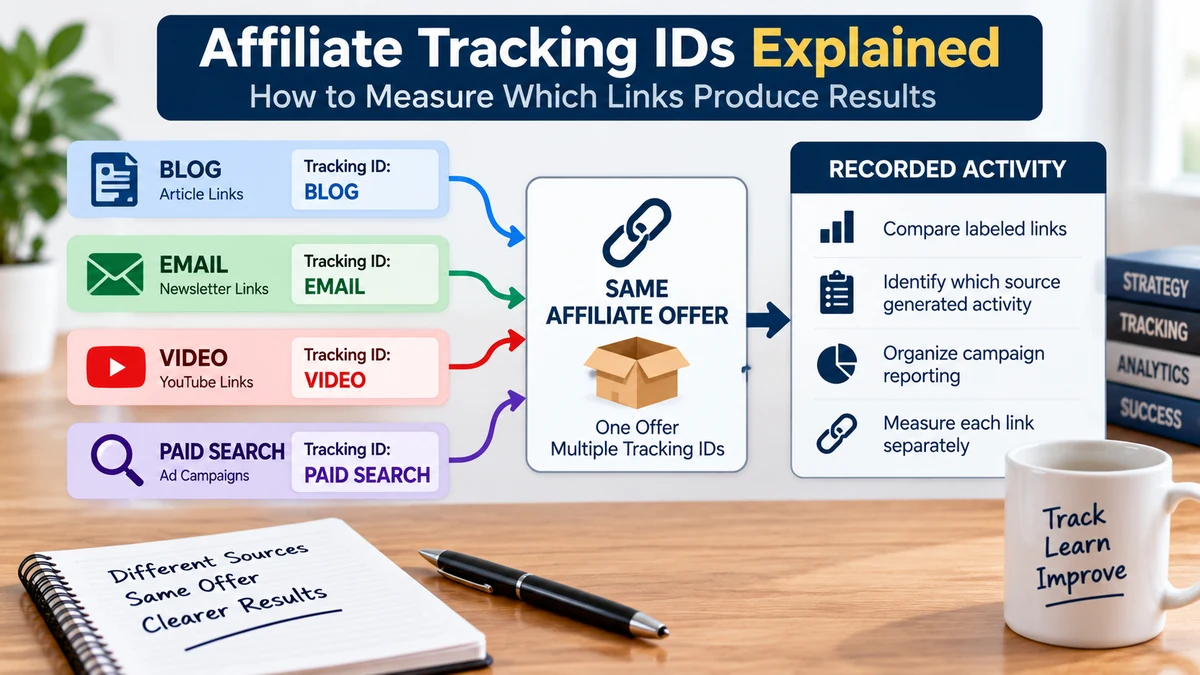
Affiliate tracking IDs help separate traffic from different campaigns, sources, ads, and placements. Learn how TIDs and modern tracking parameters work and how to use them without making tracking overly complicated.
If you use the same affiliate link everywhere, you may be able to see total clicks and sales—but you may not know which promotion actually produced them.
That is where affiliate tracking IDs become useful.
A tracking ID is an optional label or parameter added to an affiliate link so activity from different traffic sources, campaigns, ads, placements, or content pieces can be separated in reporting.
For example, instead of seeing only that an offer generated five sales, you may be able to identify that:
That information makes your data much more useful because it helps you understand what is actually driving the results.
An affiliate tracking ID is an identifier attached to a tracking link so activity can be associated with a particular campaign, traffic source, placement, or promotion.
The affiliate network already needs to know which affiliate referred the visitor.
A tracking ID adds another layer of information for the affiliate.
It might help answer questions such as:
The exact tracking options depend on the affiliate network.
These two terms are easy to confuse.
Your affiliate ID identifies you as the affiliate who should receive credit.
Your tracking ID helps you identify which of your own promotions produced the activity.
For example:
You usually do not need a separate affiliate account for every traffic source.
Tracking IDs let one affiliate account separate different campaigns more cleanly.
Without campaign-level tracking, your reports can become difficult to interpret.
Imagine you promote one offer using:
If all five promotions use the exact same unlabeled affiliate link, you may know the total number of sales but not which promotion deserves credit.
That makes optimization much harder.
You might accidentally pause a campaign that is working while continuing to spend time or money on one that is not.
One of the simplest uses is identifying where traffic came from.
You might create labels such as:
Those labels can help you compare broad traffic sources.
But source-level tracking is only the beginning.
Suppose you run several paid search campaigns.
Instead of labeling every click simply as “search,” you may want to separate:
This is especially useful when several campaigns promote the same offer.
A tracking structure gives each campaign its own identity.
On ClickBank, the traditional affiliate tracking identifier is called a TID, short for Tracking ID.
ClickBank allows affiliates to add a TID to a HopLink so clicks and purchases can be associated with that label.
According to ClickBank’s current HopLinks Guide, a TID is an optional alphanumeric value added to the affiliate link.
For example, a simplified link might contain:
&tid=blog_article_1
If a qualifying purchase occurs through that tracked referral, the TID can appear in ClickBank reporting so the affiliate can identify which promotion produced it.
TIDs continue to work on ClickBank.
However, ClickBank has expanded its tracking system beyond one TID field.
Its current Affiliate Tracking Parameters documentation explains that affiliates can now pass separate values for different campaign data points.
This can make reporting easier than trying to squeeze several pieces of information into one long TID.
ClickBank’s newer tracking parameters allow affiliates to label different parts of a campaign separately.
Current options include fields for:
For example, instead of creating one long tracking ID such as:
google_paid_campaign1_adgroup2_ad3
you can separate the data into specific parameters.
Conceptually, that might look like:
Each field has a clearer purpose.
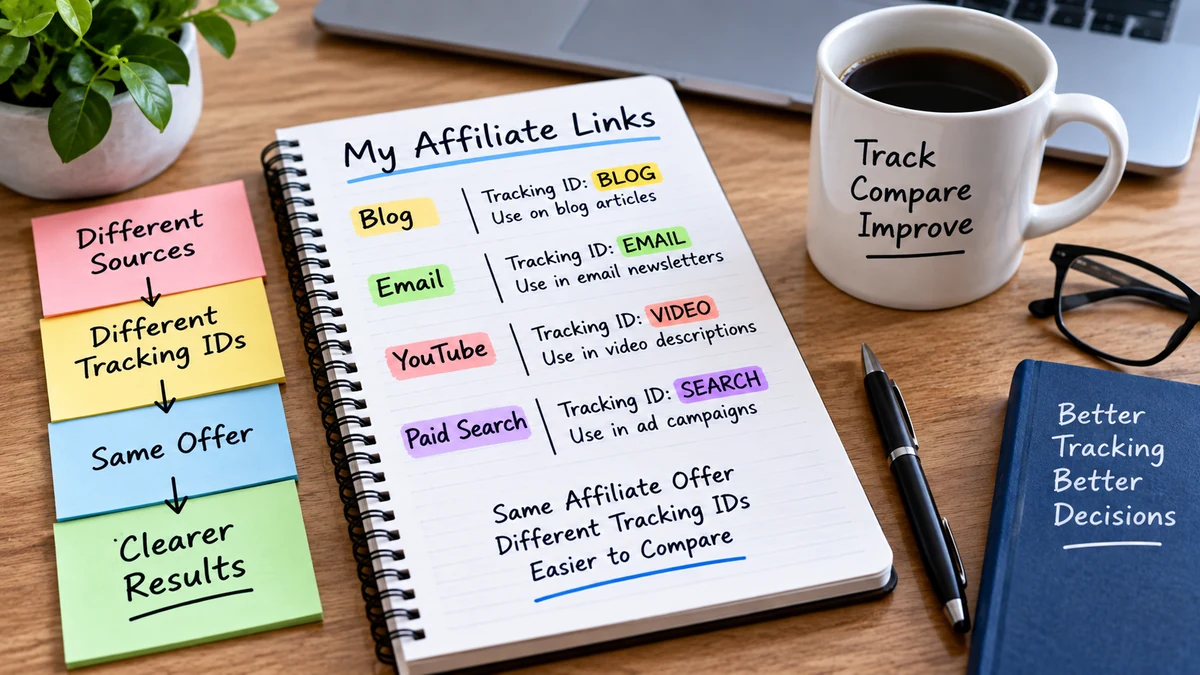
If several pieces of information are packed into one label, you may have to decode the name manually.
Separate parameters make the reporting structure easier to filter and compare.
For example, you may want to compare:
A structured naming system makes those comparisons easier.
It is possible to make tracking so complicated that maintaining it becomes harder than the campaign itself.
A beginner usually does not need dozens of tracking fields.
Start with the information you will genuinely use.
For example, you may only need:
If those three pieces answer your questions, adding ten more parameters may provide very little benefit.
Consistency matters more than clever names.
Imagine labeling the same source three different ways:
Your reporting may treat those as different values even though they refer to the same source.
Choose one naming style and keep it consistent.
For example:
Simple names are usually easier to maintain.
A tracking label should still make sense when you look at the report weeks or months later.
A label such as:
campaign_3
may be difficult to remember.
A more descriptive label such as:
beginner_search_sep26
may provide more context.
Do not make labels so long that they become difficult to manage.
If several articles link to the same affiliate offer, tracking them separately can show which content produces outbound activity and sales.
For example:
This can help you distinguish between pages that attract traffic and pages that actually move visitors toward the offer.
Sometimes the same page contains more than one affiliate link.
You may want to know whether visitors click:
Tracking those placements separately can provide useful information.
But again, only add that level of detail when you intend to use it.
This is another common source of confusion.
UTM parameters are usually used with analytics platforms to describe where website traffic came from.
Affiliate tracking IDs are usually used inside the affiliate network’s tracking system to identify the source or campaign associated with affiliate activity.
They can complement each other.
For example:
The two systems help answer different parts of the visitor journey.
Your analytics platform and affiliate network do not necessarily measure activity in exactly the same way.
Differences can occur because of:
A small difference between systems does not automatically mean one of them is broken.
The goal is to understand what each system is designed to measure.
A tracking ID labels a campaign or source.
It does not determine how the network decides which affiliate receives credit.
Attribution rules still matter.
For example, if a network uses last-touch attribution, a later affiliate referral may replace the earlier one even if your original link contained a tracking ID.
Our guide to affiliate cookie duration and attribution explains how the tracking window and attribution model work together.
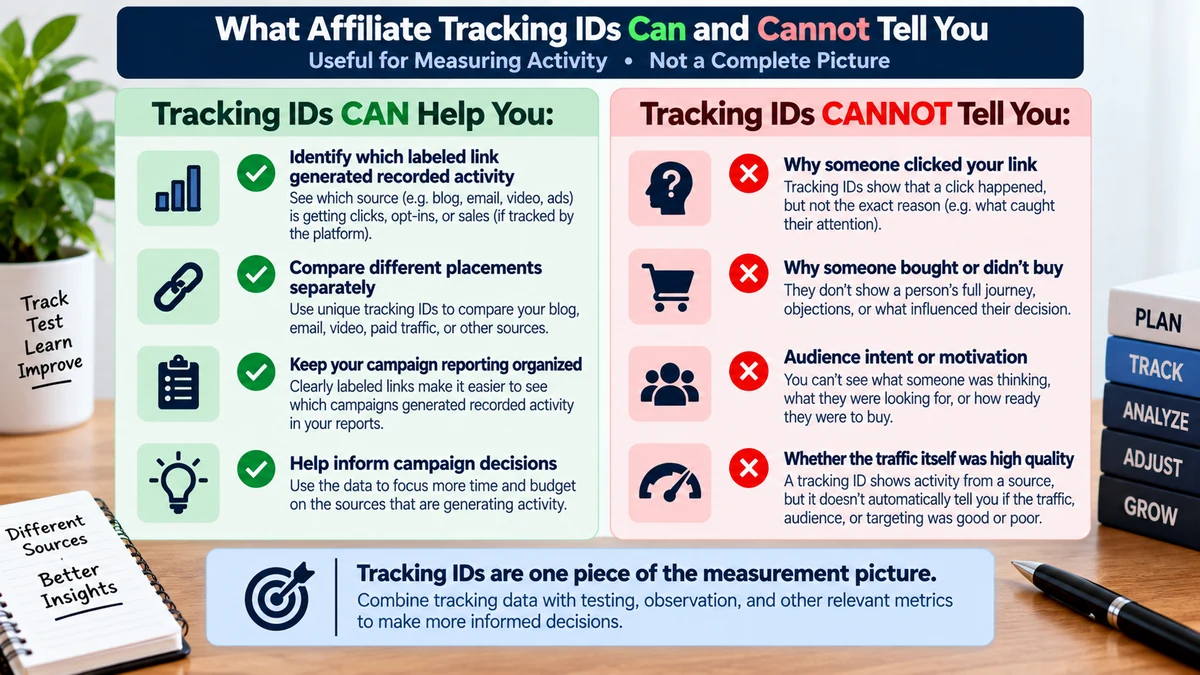
A tracking label tells you where traffic came from.
It does not automatically tell you whether the traffic was good.
You still need to evaluate:
Our guide to affiliate traffic quality explains how to evaluate those signals together.
Tracking becomes especially valuable when you run controlled tests.
Suppose you test two ads that send traffic to the same page.
If both ads use the same unlabeled affiliate link, downstream sales may be difficult to connect back to the specific creative.
Using separate tracking labels makes that comparison easier.
This is one reason tracking should be planned before the campaign starts rather than added after the data has already been mixed together.
If one tracking ID represents a blog article today and a paid advertisement next month, the reporting becomes ambiguous.
Once a label has a meaning, keep that meaning consistent.
Creating a new label is usually easier than trying to remember when an old one changed purpose.
A simple spreadsheet can prevent naming confusion.
You might record:
This becomes especially useful as the number of campaigns grows.
Never assume a tracking parameter is working simply because the URL looks correct.
Before launching:
ClickBank’s HopLinks documentation specifically recommends testing links before using them in promotions.
Affiliate networks can have specific rules for tracking parameter values.
For example, ClickBank’s current tracking documentation defines allowed characters and character limits for its parameters.
The older TID system also has its own formatting rules.
Use the network’s official link builder whenever practical and follow the current documentation rather than guessing at the URL format.
For paid traffic, ClickBank’s newer parameter system can record fields such as:
That structure can help an affiliate compare performance across different levels of the campaign.
For example, you might discover:
Those differences become much easier to see when the links are labeled properly.
Some advertisers and tracking platforms assign a unique identifier to every click.
ClickBank’s current tracking-parameter system includes fields designed for unique external click identifiers and other click-level data.
These are more useful when integrating ClickBank with advanced third-party tracking or advertising systems.
A beginner does not need to start there.
First learn to separate your major campaigns clearly.
Every tracking parameter should help answer something.
For example:
Question: Which traffic source produces more sales?
Track the traffic source.
Question: Which ad creative performs better?
Track the creative.
Question: Which blog article produces affiliate activity?
Track the article or placement.
This keeps tracking tied to decisions rather than collecting data simply because it is available.
Suppose one tracking label shows 500 clicks and another shows 100.
The first campaign may look better at first.
But what if:
The smaller traffic source may be more valuable.
Tracking IDs help you connect the volume with the result.
Try to avoid comparing campaigns with completely different purposes as though they should behave identically.
A broad educational article may attract lower-intent readers than a product comparison page.
A cold paid advertisement may behave differently from an email sent to an existing subscriber.
Tracking IDs help separate those sources, but interpretation still requires context.
One of the strongest uses of tracking labels is controlled campaign testing.
Imagine two ad versions:
creative_acreative_bIf everything else remains consistent, you can compare the downstream results more clearly.
Our guide to testing an affiliate campaign without changing everything at once explains why controlling variables makes campaign data easier to interpret.
A perfect tracking system that you stop using after two weeks is not very useful.
Build something you can maintain consistently.
A beginner-friendly structure might be:
Traffic Source → Campaign → Placement or Creative
That is often enough to answer the most important early questions.
You can add more detail later if the campaign grows.
Suppose you promote one affiliate offer using three methods:
You could label them separately:
keyword_articleweekly_emailpaid_searchIf the network later reports:
keyword_articleweekly_emailpaid_searchyou now have a clearer question to investigate.
The answer might involve traffic quality, campaign economics, message match, sample size, or the offer itself.
The tracking label does not explain why the result happened—but it tells you where to look.
Before launching a promotion, check:
Affiliate tracking IDs are one of the simplest ways to make campaign data more useful.
They help turn one generic affiliate link into separate, measurable promotions.
You can use them to distinguish traffic sources, campaigns, ads, articles, emails, or other placements.
On ClickBank, the traditional TID still works, while newer affiliate tracking parameters provide more structured ways to record traffic source, campaign, ad group, creative, and other information.
You do not need to track everything.
Track the information that answers real campaign questions.
Name it consistently.
Test the link before launch.
Then compare the downstream results instead of judging campaigns from click volume alone.
That is enough to turn tracking from a technical chore into a practical tool for better affiliate decisions.
Subscribe to get the latest posts sent to your email.
If you found this guide helpful, please tap the Like button and share it with someone who could benefit. Every Like and Share helps more people discover Partner to Wealth.