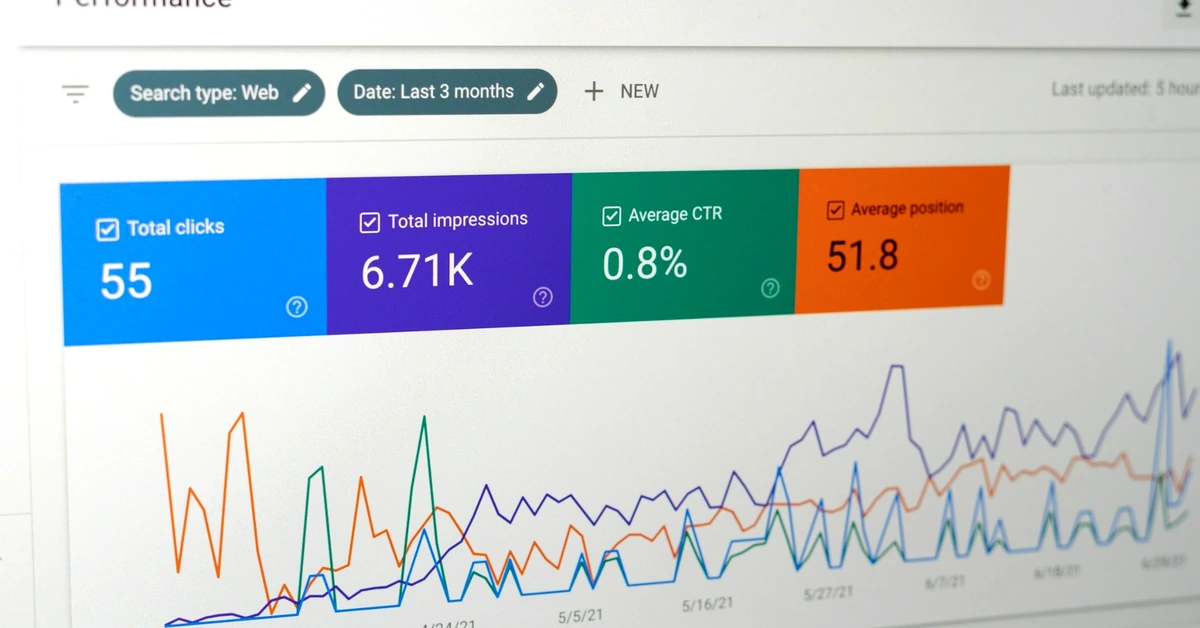
Google Search Console can reveal what people already search for, which pages are gaining visibility, and where your affiliate content has room to improve.
Coming up with affiliate content ideas is easy when a site is new. Almost every beginner question feels available, and there are dozens of obvious topics waiting to be covered.
The challenge changes as your site grows.
Once you have dozens or hundreds of posts, guessing what to write next becomes less efficient. Some topics may already be covered. Others may sound promising but have little connection to what people are actually finding your site for.
That is where Google Search Console for affiliate content research becomes useful.
Instead of relying only on keyword tools or brainstorming, Search Console lets you study the searches for which your existing pages are already appearing. Those queries can reveal missed subtopics, weak pages that deserve improvement, and new content ideas that are closely connected to real search behavior.
This does not mean every impression should become a new article. The goal is to use the data as evidence so you can make better content decisions instead of publishing blindly.
Google’s Search Console Performance report provides several useful measurements, including clicks, impressions, click-through rate, average position, queries, and individual pages. You can review Google’s official explanation of the Search Console Performance report here.
For an affiliate site, those numbers can help answer questions such as:
Search Console is especially valuable because it shows how Google is already connecting your published content with actual searches.
A traditional keyword research tool might tell you that a phrase appears attractive in theory. Search Console can show that your own site is already receiving impressions for that subject.
That is a different kind of signal.
The Queries section is usually the most obvious place to begin.
Open the Performance report, choose the search-results view, and examine the queries for which your site has appeared.
You are not simply hunting for the query with the most impressions.
You are looking for patterns.
For example, imagine an affiliate site has a broad article about choosing email marketing software. Search Console might show impressions for searches such as:
Those queries do not necessarily belong in one article.
Some may represent supporting topics. Some may indicate that an existing article needs a clearer section. Others may justify an entirely new article.
The job is to determine what the searcher appears to need.
As you review your Search Console data, most useful opportunities will fall into one of three groups.
Suppose one article receives substantial impressions for an important query but very few clicks.
Creating another article about the same subject may not be the best first move.
Review the existing page instead.
Ask whether:
You should also interpret click-through rate in context. A page appearing near the bottom of a results page will naturally behave differently from one appearing near the top.
Do not treat one metric in isolation.
Another common pattern occurs when an existing page begins appearing for related searches that are useful but broader than the article’s real purpose.
This can reveal a missing supporting article.
For example, a page about choosing an affiliate offer might begin appearing for searches about evaluating an offer’s audience, commission structure, sales page, or funnel.
Trying to turn the original page into a giant guide covering every possible issue could make it less focused.
A better option may be to create a supporting article and connect the pages through internal links.
This is one reason a deliberate affiliate content cluster can become more valuable as your site grows. Search Console can help you see which branches of that cluster real searchers are beginning to explore.
Sometimes you will find a query that is clearly relevant to your audience but is only loosely connected to the page Google currently displays.
That can be one of the strongest opportunities in the report.
If your existing page does not adequately answer the question, a dedicated article may serve the reader better.
The important distinction is that you are not creating the new page merely because the query exists.
You are creating it because:

One of the most useful Search Console habits is moving back and forth between the Queries and Pages views.
A query by itself gives you only part of the story.
You also need to know which page Google associates with that search.
Click a promising query and then review the Pages tab.
If the page Google is showing is already a strong match, you may simply need to improve it.
If the page is only a partial match, you may have found a content gap.
If several of your pages appear for nearly the same search intent, however, be careful.
You do not want to respond by creating another nearly identical article and make the overlap worse.
A growing affiliate site should not assume that every promising query requires another URL.
Use this simple decision process.
Update the existing page when:
Consider a new article when:
This discipline becomes increasingly important as your content library expands.
Publishing another page is easy. Publishing another page that adds meaningful topical coverage without creating unnecessary duplication takes more thought.
High impressions can look exciting, but impressions alone are not a reason to write an article.
A search may be too broad, unrelated to your business model, dominated by a different type of result, or simply inconsistent with the audience you want to attract.
Before acting on a query, ask:
That last question matters for affiliate publishers.
Traffic only becomes useful when it reaches the right audience. A large number of irrelevant impressions or curiosity clicks does not automatically create a stronger affiliate business.
If you are evaluating that broader issue, review how to determine whether you are attracting qualified affiliate traffic rather than looking at visitor counts alone.
Search Console research becomes much more useful when you turn the observations into an actual writing plan.
Before creating the article, record:
That information can feed directly into an affiliate content brief before writing begins.
This keeps Search Console from becoming another analytics dashboard that you check without doing anything with the information.
Search data can identify the opportunity, but it does not automatically tell you how the article should be structured.
Different searches may call for different formats.
A query beginning with “how to” may need a tutorial.
A search comparing two approaches may need a comparison article.
A beginner asking what something means may need an educational guide.
A reader evaluating a specific product may need a review or fit-based evaluation.
The better your format matches the reader’s situation, the easier it becomes to create content that actually satisfies the query.
If you need to decide how an opportunity should be presented, use the same principles covered in choosing the right affiliate content format.
Search Console data should inform decisions, not trigger constant rewriting.
A few additional impressions one day do not necessarily mean you discovered your next major content category.
Search visibility can fluctuate.
Newer pages can also appear for different queries while Google continues evaluating where the content belongs.
Look for patterns that remain meaningful across a reasonable period rather than rebuilding an article every time a chart moves.
For a growing affiliate site, a practical approach is to periodically review:
You do not need a complicated spreadsheet to decide which opportunities deserve attention first.
For each promising query or page, rate a few basic factors.
Is this something your intended reader genuinely cares about?
Do you already have a page that answers the question well?
Is your site already earning enough impressions or clicks to make the opportunity worth investigating?
Would attracting this reader support the broader purpose of the site?
Would the article strengthen an existing group of related content?
Is the topic different enough to deserve its own article?
You can then prioritize topics that perform well across several of these factors instead of publishing whatever query happens to have the largest number beside it.

You can turn everything above into a repeatable process.
This process is slower than blindly pulling ten keywords from a tool.
It is also more deliberate.
Google Search Console can show what is happening. It cannot decide your content strategy for you.
A query can have impressions and still be a poor topic.
A page can have a low click-through rate and still be performing reasonably for its current position.
A new article can target an interesting keyword and still create unnecessary overlap with something you already published.
Use the data as evidence.
Then apply editorial judgment.
For affiliate publishers, the best opportunities usually sit at the intersection of several things: real search visibility, clear audience intent, useful expertise, strong internal-link potential, and a logical relationship to the rest of the site.
As an affiliate site grows, content planning should become more disciplined rather than more random.
Google Search Console gives you a direct view into the searches and pages already earning visibility. That information can help you uncover questions you have not fully answered, pages that deserve improvement, and supporting topics that can strengthen your existing content structure.
The key is not to turn every query into another article.
Use Search Console to identify the opportunity. Check what you already have. Understand the intent. Decide whether the answer belongs on an existing page or deserves its own URL. Then build the article around what the reader actually needs.
That approach gives you something far more useful than an endless list of keywords: a content strategy informed by how people are already discovering your site.
Subscribe to get the latest posts sent to your email.
If you found this guide helpful, please tap the Like button and share it with someone who could benefit. Every Like and Share helps more people discover Partner to Wealth.