
Your affiliate emails need more than a good subject line. Learn how SPF, DKIM, and DMARC help authenticate messages, what Gmail and Yahoo expect from senders, and how to check your setup without making risky DNS changes.
You write a useful affiliate marketing article, invite readers to subscribe, and prepare a helpful follow-up email. Everything appears ready. But there is a technical question many beginners overlook: How does an email provider know that a message claiming to come from your domain is actually authorized?
That’s where email authentication comes in.
Three important standards—SPF, DKIM, and DMARC—help receiving email systems evaluate whether messages are legitimately associated with the domains they claim to represent.
For affiliate publishers, newsletters, autoresponders, and website owners, understanding these standards is part of building a more reliable email operation.
This guide explains email authentication for affiliate marketers in plain English, including what the three standards do, how they work together, and how to check your setup without accidentally disrupting existing email services.
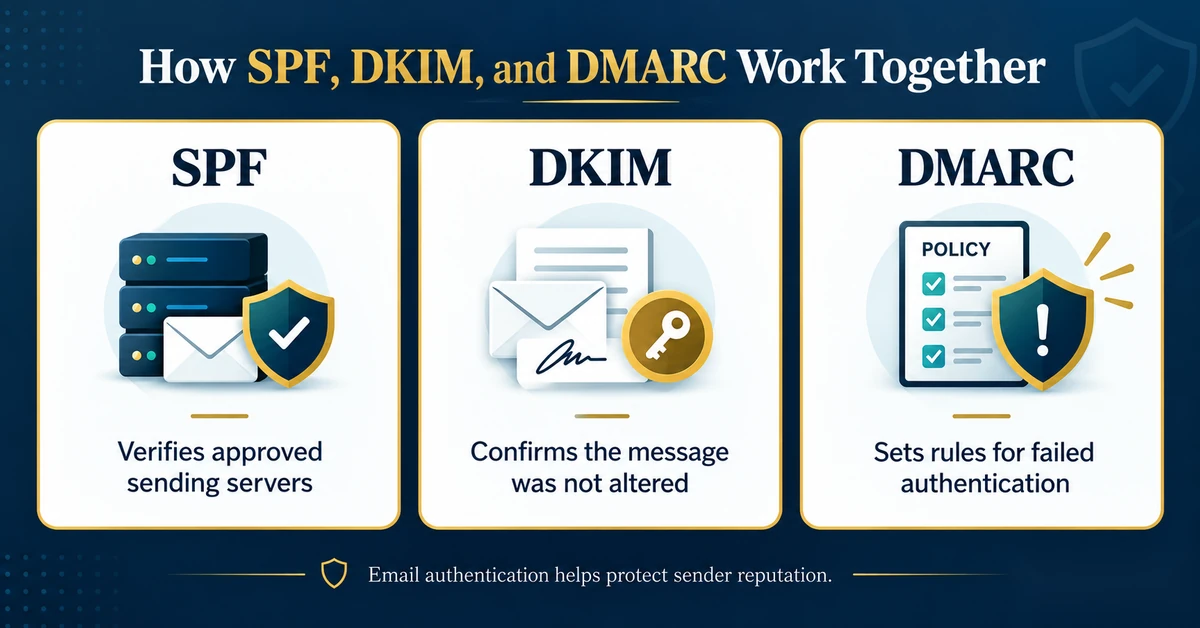
Quick answer: SPF identifies servers authorized to send email for a domain, DKIM adds a verifiable digital signature to messages, and DMARC helps receiving systems evaluate whether authenticated domains align with the address readers see in the From field. Authentication supports trustworthy email delivery, but it cannot guarantee inbox placement.
[IMAGE 1 — INSERT HERE]
Affiliate marketing often involves more than publishing articles and linking to products. You may also operate a newsletter, offer a free educational report, send welcome messages, or maintain an autoresponder sequence.
Those activities rely on email systems communicating with recipients’ inbox providers.
Unfortunately, email can also be misused. Someone may attempt to impersonate a legitimate business, forge a sender address, or send unwanted messages through unauthorized infrastructure.
Email authentication helps receiving systems distinguish authorized sending activity from suspicious attempts.
When authentication is missing or misconfigured, legitimate messages may encounter delivery problems, including spam filtering or rejection.
However, passing authentication is not equivalent to earning the trust of every recipient. Gmail, Yahoo, and other mailbox providers also consider sending reputation, recipient behavior, unwanted-email complaints, and additional signals.
For a small affiliate publisher, the goal is not to manipulate spam filters. It’s to establish an email system that is technically sound and consistently sends messages readers actually requested.
These standards perform different jobs. Understanding their individual purposes is easier than trying to memorize complicated DNS settings immediately.
| Standard | Main purpose | What it helps verify |
|---|---|---|
| SPF | Sender Policy Framework | Whether the sending mail server is authorized for the domain used in the SPF check |
| DKIM | DomainKeys Identified Mail | Whether a message has a valid cryptographic signature associated with a signing domain |
| DMARC | Domain-based Message Authentication, Reporting and Conformance | Whether successful SPF or DKIM authentication aligns with the visible From domain, and how failures should be handled under the published policy |
Think of them as complementary checks rather than interchangeable settings.
SPF is a mechanism through which a domain publishes information about the servers permitted to send email on its behalf.
That information is generally stored in a specially formatted DNS TXT record.
When a message arrives, a receiving server can compare the sending server’s IP address against the SPF policy published for the relevant envelope-sender domain.
Consider a hypothetical publisher who uses one provider for normal business email and another platform for newsletters.
Both services may be legitimate, but the publisher still needs to understand how each service authenticates outgoing messages.
Depending on the services involved, the domain’s SPF configuration may need to authorize particular infrastructure. Some email platforms instead rely on provider-managed envelope domains, so their exact authentication arrangements may differ.
That’s why blindly copying SPF records from an online tutorial is risky.
Important: A domain should not have multiple independent SPF TXT policies at the same hostname. An existing SPF configuration should be reviewed and updated carefully when necessary, rather than adding an unrelated second SPF policy.
If you operate more than one sending service, consult each provider’s current instructions and consider having a qualified administrator review the combined configuration.
You can learn more from Google’s official email sender guidelines.
DKIM adds a cryptographic signature to an outgoing email.
The sending service signs selected message information using a private key. Receiving systems can then use the corresponding published public key to verify the signature.
A successful DKIM check provides evidence that the message was signed by a system authorized to use the signing domain and that the signed information has not been improperly altered.
DKIM does not, by itself, establish that the sender’s business claims are truthful or that the recipient requested the message.
A newsletter platform may send email from shared infrastructure on behalf of many customers.
DKIM provides a way to associate individual messages with authenticated signing domains rather than relying solely on the sending server’s identity.
When properly configured, it can help receiving systems evaluate the legitimacy of your messages.
The technical setup may involve DNS records supplied by your email provider. Some services use CNAME records pointing to provider-controlled keys, while other configurations publish DKIM keys directly as TXT records.
There is no universal record you should paste into every domain.
Practical advice: Use the exact domain-authentication instructions supplied by the service that sends your messages. Do not assume that records for one newsletter platform also configure a second platform.
DMARC builds on SPF and DKIM by checking domain alignment.
Here’s why alignment matters.
Imagine that a reader receives an email displaying newsletter@example.com in the From field. A technical authentication check might succeed for a separate domain used by the sending service.
That authentication result alone does not necessarily establish a connection to the visible example.com From domain.
DMARC addresses this problem by requiring at least one passing authentication mechanism—SPF or DKIM—to align with the message’s visible From domain under the applicable alignment rules.
DMARC also allows domain owners to publish a policy describing how receiving systems should handle messages that fail its checks.
Receivers make the final handling decision according to their implementations and policies.
Moving to a more restrictive policy without identifying every legitimate sending service can disrupt messages you actually want delivered.
That’s why a careful authentication audit should come before enforcing stricter DMARC handling.
Gmail and Yahoo have published authentication and sender-behavior requirements. These are not just recommendations about writing better subject lines; they include technical checks.
Google states that senders emailing personal Gmail accounts must use SPF or DKIM authentication, along with other infrastructure and message-format requirements.
For senders reaching approximately 5,000 or more messages per day to personal Gmail accounts, additional requirements apply, including SPF, DKIM, DMARC, and specific unsubscribe practices for marketing or subscribed messages.
Google’s policies also address unwanted-email complaint rates and authentication alignment.
A small newsletter with relatively few subscribers should not automatically be described as a bulk sender. However, following good authentication practices before your audience grows is sensible.
Review the latest requirements in Google’s sender guidelines and its sender guidelines FAQ.
Yahoo also distinguishes between general sending requirements and additional requirements for bulk senders.
Its published standards include SPF or DKIM for all senders, with SPF, DKIM, DMARC, aligned authentication, and suitable unsubscribe support for bulk mailings.
Yahoo also emphasizes sending relevant messages to people who requested them and maintaining low complaint rates.
See the official Yahoo Sender Hub best practices for the current details.
No.
Even if SPF, DKIM, and DMARC pass, messages may still be filtered based on reputation, recipient engagement, content characteristics, sending patterns, and other signals.
Authentication is an important foundation, not a promise that every message will appear in the primary inbox.
If your emails are already sending successfully, begin with inspection rather than editing domain records.
You can learn a great deal before touching your website or mail configuration.
Write down the services responsible for different types of messages.
Examples might include:
These services may use different sending domains, DKIM configurations, or envelope-sender arrangements.
Not every website plugin independently operates a mail server, so determine which actual provider is responsible for sending each message.
Open your email service’s settings and look for domain verification, sender authentication, or deliverability information.
Record whether the service reports the domain as authenticated, pending, or requiring attention.
Do not assume that verifying access to a sender email address automatically establishes complete SPF, DKIM, and DMARC authentication. These may be separate steps.
Use your existing platform’s supported test feature and send a legitimate test email to your own address.
In Gmail, the message menu offers a Show original option that can display authentication results and technical headers.
Depending on the message and receiving system, the results may include SPF, DKIM, and DMARC statuses.
Look for pass or fail results and, where available, the domains associated with authentication.
Be aware that an apparent pass for a service-provider domain may not establish that the message also passes DMARC alignment with your own visible From domain.
If you use both a newsletter service and an autoresponder, inspect a test message from each.
Do not assume that a successful result from one proves the other service is configured correctly.
For example, one platform may authenticate through your custom domain while another uses its own sending infrastructure and configuration.
The purpose of the comparison is to identify differences—not to declare one service defective without understanding its documented design.
If authentication appears incomplete, consult your email provider’s official setup guidance before making changes.
DNS changes should preserve every legitimate sending service. Avoid replacing existing TXT records simply because a new tutorial supplies a different example.
If you do not administer your domain’s DNS yourself, consider asking your domain administrator or hosting provider to review the records with the relevant email-service documentation.
Safety note: Do not delete working MX records, replace an established SPF policy blindly, or activate restrictive DMARC enforcement without understanding the effects on your existing email system.
Publishing competing SPF policies at the same hostname can cause evaluation problems. Check the current configuration before making additions.
HTTPS protects communications with a website. SPF, DKIM, and DMARC concern email authentication.
Having a valid SSL certificate on your WordPress website does not prove your newsletter is properly authenticated.
A strict policy can be useful when deployed correctly, but activating it before accounting for legitimate senders may cause valid messages to fail.
Review and test the entire sending environment first.
A message can pass technical authentication and still be unwanted.
Likewise, a visitor registering through a merchant’s signup page does not automatically authorize an independent affiliate to email them.
Our article Affiliate Leads vs. Vendor Leads: Who Can You Actually Email? explains the distinction between referral tracking and subscriber permission.
One successful test confirms that a particular message reached one inbox at one moment.
It does not prove that every domain, every sending provider, and every subsequent message will behave identically.
For a more complete subscriber-journey check, see our Affiliate Email Funnel Testing guide.
A healthy newsletter program needs both technical reliability and sound subscriber practices.
Authentication helps receivers evaluate whether a message comes through an authorized sending arrangement. List quality helps ensure the recipients actually want the messages.
Those are separate responsibilities.
For example, a fully authenticated email campaign can still perform poorly if the audience is not interested, the content is irrelevant, or the sender continues contacting unresponsive recipients.
Similarly, a permission-based list can encounter unnecessary delivery problems when a sending domain is misconfigured.
It’s worth paying attention to both sides of the equation:
For subscriber maintenance, read Email List Hygiene for Affiliate Marketers.

You don’t need to become a full-time email administrator to run an initial review. Use this checklist to organize the important questions.
| Check | Question to answer |
|---|---|
| Sending services | Do I know which platforms send email using my business identity? |
| From address | Do messages show the intended sender and domain? |
| SPF | Is the relevant sending arrangement covered by an appropriate SPF configuration? |
| DKIM | Does the provider report DKIM authentication as properly configured? |
| DMARC | Is there a suitable policy and does at least one passing authentication mechanism align with the visible From domain? |
| Test messages | Have I reviewed actual authentication results from the services I use? |
| Subscriber permissions | Have recipients requested the messages they receive? |
| Changes | Have I documented the existing setup before adding or changing another sending service? |
If you find an issue, correct it using the relevant provider’s current instructions. Avoid changing multiple DNS settings simultaneously without a way to verify which change produced which result.
Mailbox-provider requirements depend partly on your sending volume and circumstances. Google requires at least SPF or DKIM for senders to personal Gmail accounts, while additional rules apply to bulk senders. Using sound authentication across all three standards is a sensible objective even for smaller operations.
That result does not automatically mean the message fails DMARC. The outcome depends on whether the passing SPF-authenticated domain aligns with the visible From domain under the applicable DMARC rules. The exact domains and test results matter.
Yes. A valid, aligned DKIM signature can satisfy the authentication-and-alignment requirement for DMARC even when SPF does not pass. The reverse may also be true with properly aligned SPF.
Not automatically. First determine which service sends the messages and whether any additional authentication records are necessary. Some services use existing provider-managed infrastructure, while others require custom-domain configuration.
Authentication cannot guarantee clicks, purchases, or commissions. It helps establish a reliable technical foundation for legitimate email communication. Actual business outcomes still depend on audience interest, useful content, appropriate offers, and other factors.
Potentially, yes. But each provider’s authentication requirements must be understood, and the domain’s records must be configured consistently. Avoid duplicating SPF policies or applying strict DMARC enforcement before verifying the entire environment.
For affiliate marketers, learning about email authentication is not merely a technical exercise.
It is part of building an email system that recipients and inbox providers can evaluate more confidently.
SPF helps identify authorized sending infrastructure. DKIM provides verifiable message signatures. DMARC connects authentication to the visible sender identity through domain alignment and published policies.
But good email marketing doesn’t stop there. Clear permission, relevant messages, reliable delivery, and respect for subscribers remain essential.
If your current email system is functioning, begin by reviewing it instead of changing settings unnecessarily. Document your sending services, inspect authentication results, and follow official provider guidance before editing DNS records.
A trustworthy email program combines sound technical configuration with messages people genuinely want to receive.
Subscribe to get the latest posts sent to your email.
If you found this guide helpful, please tap the Like button and share it with someone who could benefit. Every Like and Share helps more people discover Partner to Wealth.